


Brooklyn Children's Museum - 10:00 AM Pick
Brooklyn Children's Museum - 10:00 AM Pick
YM & YWHA of Washington Heights and Inwood - 10:30 AM Pick
Children's Museum of Manhattan - various times Pick
Grand Central Gallery Annex - 10:00 AM
New-York Historical Society - 11:00 AM
Bay Ridge Prep Lower & Middle School - 9:00 AM
Children's Museum of Manhattan - various times Pick
Children's Museum of Manhattan - various times Pick
Children's Museum of Manhattan - various times Pick
Sugar Hill Children's Museum of Art & Storytelling - 11:00 AM Pick


Activity Guides
- Beaches & Lakes
- Best Of Lists
- Birthday Parties
- Boats
- Boredom Busters
- Camps
- Childcare
- Christmas/Hanukkah
- City Guides
- City Hacks
- Classes & Enrichment
- Community
- Crafts & Recipes
- Earth Kids
- Easter
- Fairs & Festivals
- Fall Activities
- Family Travel
- Farms & U-Pick
- Free Activities
- GoList
- Halloween
- Holidays
- Hotels & Resorts
- Indoor Activities
- Museums
- News & Openings
- Outdoors
- Parent Talk
- Parks & Playgrounds
- Play Gyms & Sports Centers
- Pools & Spray Parks
- Preschools & Schools
- Restaurants
- Shows
- Skiing & Winter Sports
- Special Needs
- Special Occasions
- Sports
- Spring Activities
- STEM
- Stores & Services
- Summer Activities
- Theme & Water Parks
- Trains, Dinos & Heroes
- TV, Film & Movies
- Virtual
- Visitors Guide
- Weekend Events
- Weekend Trips
- Winter Activities
- Zoos & Gardens
Best Shared Family Calendar Apps (Tested by a Real Parent)

If you’ve ever missed a Spirit Day, double‑booked soccer practice, or realized after pickup that early dismissal was today... "Hi! Welcome to the club." This is exactly why I went down the rabbit hole of family calendar apps in the first place.
For Mommy Poppins, I didn’t just research these apps; I actually used them with my own family. On iPhones, Android devices, and laptops. With kids who sometimes check apps… and sometimes make me wonder why I pay for cell phone service
Below are the best shared family calendar apps I’ve personally tested — what actually worked in real life, what felt over hyped, and which families each app is truly best for. For more tried-and-tested parenting hacks, check out our Mommy Poppins Parenting Hacks Guide.
OUR LATEST VIDEOS
What Are the Best Shared Family Calendar Apps Right Now?
After testing a wide range of family scheduling apps, shared calendars for families, and family organization apps, these are the ones that consistently reduced mental load and prevented missed activities — without becoming another thing moms have to manage.
This is a curated list, not a popularity contest. Some well-known apps didn’t make the cut, keep reading and you'll see why below.
How Do Shared Family Calendar Apps Make Parenting Easier?
When they work, the right family planning tools do more than track events:
- Fewer “I didn’t know about that” moments
- Clear visibility for both parents
- One place for school, sports, appointments, and activities
- Built‑in shared to‑do lists for families and chore and task tracking apps
- A noticeable reduction in the mental load that so often falls on moms
The key is choosing an app that fits your family — your kids’ ages, your devices, and whether you’re coordinating across households.
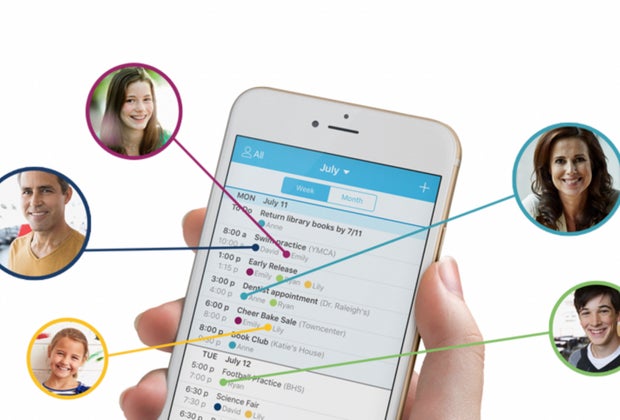
Here's what your calendar could look like with Cozi, and everyone can access the same setup. Photo by Cozi
Which Family Calendar App Is Easiest for Busy Parents to Set Up?
Cozi Family Organizer
Available on: iOS, Android, web
Why Mommy Poppins families love it:
Cozi remains one of the most approachable family calendar apps out there. Setup took me under 10 minutes, and I didn’t need to walk anyone through it afterward.
My real life experience:
This was the first app everyone in my house actually used. Color‑coding by kid is intuitive, shared lists are simple, and the weekly email summary became something I relied on more than I expected. I loved the shopping and to-do lists as well.
Best for: Tech‑averse parents, big families, moms who want quick wins.
One thing I didn’t love: Ads in the free version were distracting.
What Is the Best Family Calendar App for Parents Who Already Use Apple Devices?
Apple Calendar (with iCloud Shared Calendars)
Available on: iOS, macOS, web (limited)
Why it works for real families:
Apple Calendar is often underestimated, but when it’s set up intentionally, it’s one of the most reliable shared calendars for families who use mainly Apple products.
My real-life experience:
This is what my family actually uses day to day. We each have color-coded calendars by person and activity, which makes it incredibly easy to glance at the week and know who’s where. Syncing across devices has been rock-solid, and because it’s built into our phones, no one forgets to check it. Even the teenager.
Kids don’t need to learn a new app, notifications are familiar (and not overwhelming), and sharing updates happens instantly.
Best for: Apple-only families, parents who want simple and dependable scheduling
One thing I’d change: Apple Calendar doesn’t include built-in chores or task lists, so we pair it with Reminders when needed
What Is the Best Family Calendar App for Parents Who Already Use Google?
Google Calendar (with Family Sharing enabled)
Available on: iOS, Android, web
Why it works:
If your life already runs through Gmail, this is the easiest option for just about anyone.
My real-life experience:
Onboarding was instant. Teens actually checked it (a win!). It easily syncs across devices — phones, Chromebooks, and laptops.
Best for: Families already living in the Google universe.
One thing I’d change: It lacks built-in features like chores or kid-friendly task tracking.
What Is the Best Shared Family Calendar App for Divorced or Co‑Parenting Families?
OurFamilyWizard
This is more than a calendar — it’s one of the most structured co‑parenting calendar apps available.
What stood out during testing:
- Custody schedules
- Communication logs
- Expense tracking
- Read receipts (hugely helpful for accountability)
My real‑life experience:
It’s thorough and effective, but not casual. There’s a learning curve, and it definitely feels more formal than most family scheduling apps. Making payments through the app is also a huge help.
Best for: Co‑parents who need clarity, boundaries, and documentation.
One thing I didn’t love: The price. It's really only worth it for high‑conflict situations.
What Family Calendar App Is Best for Kids Who Need Visual Scheduling?
FamCal
Available on: iOS, Android
Why it works:
FamCal leans heavily into visuals, which makes a big difference for younger kids.
My real‑life experience:
Elementary‑age kids understood this app quickly. The combination of calendar and shared task lists worked well for daily routines. I loved how easy it was to keep the whole family organized. Chores, grocery lists, and extra-curriculars are all easily organized.
Best for: Visual learners, elementary school families.
One thing I’d change: The interface feels a little dated and can sometimes be a bit cluttered.
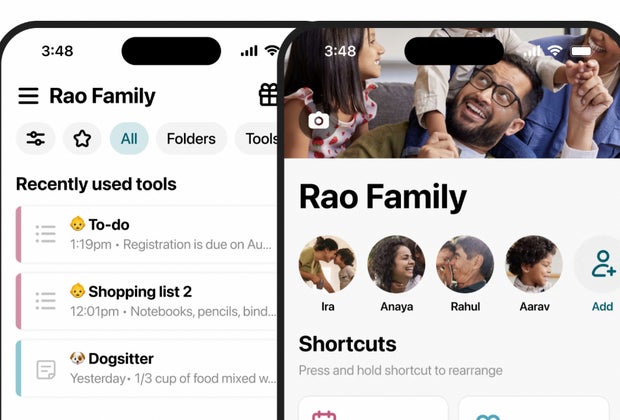
Maple's interface is easy and combines everything you need. Photo by Maple
What’s the Best All‑in‑One Family Planner for Sports, School, and Activities?
Maple
Why it stood out:
A modern interface that combines calendars, meal planner, shared email, and project folders.
My real‑life experience:
Once everything was set up, it was powerful, especially for managing multiple sports schedules. You can also share folders with the babysitter so everything can truly be in one spot.
Best for: Families juggling multiple kids, sports, and activities
One thing I’d change: A simpler “starter” mode for new users
What Are Some Cool or Lesser‑Known Calendar Apps Parents Should Try?
- Teamup Calendar: Great for school classes and sports teams
- FamilyWall: A solid all‑in‑one option
- Any.do: Better for parents than younger kids
What Family Calendar Apps Did We Not Include — and Why?
- Apple Calendar alone: Too bare‑bones for real family organization
- Notion: Powerful, but unrealistic for most busy parents
- Paper planners: Pretty, but not shareable or syncable
How Do I Choose the Right Shared Family Calendar for My Family?
Ask yourself:
- Do you need chores and tasks, or just scheduling?
- Are your kids old enough to check an app?
- Are you on iPhone, Android, or both?
- Are you coordinating across households?
- Do school or sports calendars need to sync automatically?
The best app is the one your family will actually use.
Family Calendar App FAQs
Q: What is the best shared family calendar app?
It depends on what your family needs. Some apps are great at color coding, others at task management or co‑parenting tools.
Q: Are family calendar apps worth paying for?
Sometimes. Paid versions often unlock advanced reminders, shared to‑do lists, and better syncing, as well as premium features.
Q: Which family calendar app is best for co‑parents?
Apps with custody schedules, secure messaging, and expense tracking work best.
Q: Can kids use these apps on their own devices?
Yes. Many offer kid‑friendly access and limited permissions to keep everyone safe.
Q: How do I sync a family calendar across iPhone and Android?
Choose apps that work on both systems or integrate with Google Calendar. You may also want a desktop option.


